In brief: what can you do with Kiuwo inside ChatGPT?
Create a mind map from a topic without copying and pasting between different tools.
Turn a long ChatGPT conversation into a visual structure you can review, edit, and save.
Use the map for lessons, revision, brainstorming, and more accessible learning materials for SLD/SEN students.
ChatGPT is no longer only a place where you type questions and receive text. With apps in ChatGPT, some external tools can work directly inside the conversation: you call them when you need them, and the workflow stays in the chat. OpenAI describes this model in its official apps documentation and Apps SDK. OpenAI Apps SDK
For teachers, students, and tutors, the benefit is practical: you do not have to think, "now I need to copy everything, open another website, rebuild the context, and generate the map." You can reason with ChatGPT and, when you need a visual structure, ask Kiuwo to turn that material into a mind map.
This changes one thing above all: long conversations do not have to stay buried in your chat history.
What apps in ChatGPT are
Apps in ChatGPT are integrations that allow third-party services to work inside the conversation. In practice, ChatGPT can move from "I answer with text" to "I help you use a connected tool", when that app is available in your account and region.
OpenAI maintains an app directory and a Help Center article for this feature. Those are the pages to check before publishing very specific instructions, because supported plans, regions, rollout timing, and app names can change. ChatGPT app directory OpenAI Help Center: Apps in ChatGPT
Availability note: if you do not see Kiuwo in your ChatGPT interface yet, it does not necessarily mean the workflow is unavailable forever. Apps can roll out progressively by plan, region, and account. Check the ChatGPT app directory and Kiuwo's official updates before sharing fixed instructions with students or colleagues.
What changes with Kiuwo inside ChatGPT
Before, the workflow was separate. You had a text, a PDF, a conversation, or an idea; then you opened Kiuwo, pasted or uploaded the material, generated the map, reviewed it, and saved it.
With Kiuwo inside ChatGPT, the path becomes more natural: you are already thinking through a topic, you ask for a map, you get a visual structure, and you can find it again in your Kiuwo profile. The important part is not just convenience. It is continuity.
If you are preparing a lesson on Galileo, you do not have to interrupt the work once the conversation becomes useful. You can ask:
- "Create a mind map from this conversation for a history of science lesson."
- "Turn everything we discussed into a map for revision."
- "Organize the key concepts into main branches and sub-branches, leaving out secondary examples."
Kiuwo stays aligned with its role: turning linear or scattered material into editable mind maps for study, teaching, and reuse. If you want the teaching perspective, read mind maps for teachers.

The real strength: mapping conversations you had forgotten
The most interesting use case is not simply "creating a map faster." It is turning the conversation itself into a map.
How many times have you had a long conversation with ChatGPT to plan a lesson, study a chapter, design an activity, clarify a topic, or organize a project? A few days later, that chat becomes hard to read again. You scroll, search, and lose the thread. The ideas are there, but they are buried in dozens of messages.
This is where Kiuwo can make a real difference: it takes what emerged in the conversation and makes it visible. It does not produce a perfect transcript, so do not treat it as one. It produces a structured draft: center, main branches, key concepts, and connections to review.
For a teacher, this means recovering a lesson planned with AI without rebuilding it from scratch. For a student, it means turning a long study session into a map for revision. For a tutor, it means taking a brainstorming session with a learner and turning it into a reusable outline.
Is it really free?
The short answer is: you can start without paying for a separate integration to use Kiuwo inside ChatGPT, when the app is available in your ChatGPT account. To save and find your maps over time, however, you need a Kiuwo account and an initial login.
The part to explain carefully is this: "free" should not become a vague promise. Using the flow inside ChatGPT can be free to start, but credit limits, advanced features, or account conditions may depend on your Kiuwo account and your ChatGPT plan. For access, product details, and current availability, always check the Kiuwo interface and official Kiuwo updates.
For school use, the practical point is simple: test the flow with a real topic before building routines, materials, or student assignments around it.
How to activate it, step by step
The practical workflow is this:
- Open ChatGPT and search for Kiuwo in the available apps.
- Enable the Kiuwo app inside ChatGPT.
- During the connection flow, create a Kiuwo account or log in with your existing account.
- Write a clear prompt, for example: "Create a mind map on this topic."
- Review the map, correct structure and content, then save it in your Kiuwo profile.
The step not to skip is review. An automatically generated map is a starting point, not a material to hand out without checking. This matters even more if you will use it for a lesson, an assessment, or learners with specific educational needs.
Concrete example: the prompt inside ChatGPT
In the example below, the workflow is already inside ChatGPT: the Kiuwo app is active in the composer, and the prompt directly asks it to generate a map about artificial intelligence.
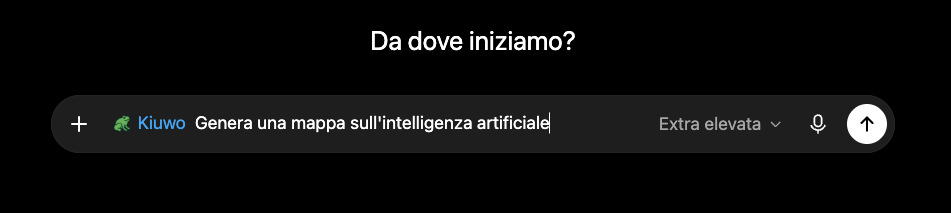
That is the practical point: you do not have to manually explain the context to another tool. You start from the chat where you are already working, call Kiuwo, and ask for a mind map with a clear instruction.
Useful prompts for teachers and students
A good prompt does not have to be long. It has to tell ChatGPT and Kiuwo what you want the map to achieve.
For teachers:
- "Create a mind map from this conversation for a 50-minute lesson."
- "Turn these notes into a revision map with only a few main branches."
- "Create a map for students with SLD: short keywords, clear hierarchy, no unnecessary details."
- "Reorganize this explanation into a map to use before a test."
For students:
- "Make me a mind map of the chapter we just summarized."
- "Turn this chat into a map for an oral exam."
- "Divide the topic into definitions, examples, causes, and consequences."
- "Create an essential map first, then a more detailed version."
If you start from PDFs, slides, or handouts, the most relevant workflow is explained in from PDFs and slides to a mind map.
Why it helps with SLD, SEN, and visual study
A mind map does not automatically make a material inclusive. But it can reduce a common problem: the load of reading, selecting, and connecting information all at once.
For students with SLD, SEN, or attention difficulties, a visual structure can help show where a concept sits, which branches are central, and which details are secondary. The UDL Guidelines emphasize the importance of offering multiple ways to represent information. CAST UDL Guidelines
Kiuwo inside ChatGPT removes one more source of friction: if the teacher or student is already working in the chat, the map starts where the reasoning is happening. Then it needs to be checked, simplified, and adapted to the real case. For a deeper guide, read concept maps for SLD and SEN.
Limits and good practices
AI is useful when it reduces mechanical work: rereading a long conversation, suggesting a structure, separating main concepts from details, and creating a first draft. It is not useful when it replaces teaching judgment.
Before using a map in class or for study, check three things:
- Faithfulness: do the main concepts actually reflect the conversation or source material?
- Hierarchy: are the branches few, clear, and readable?
- Privacy: have you avoided adding personal data or unnecessary sensitive information?
UNESCO highlights the importance of using generative AI in education with human supervision, transparency, and responsibility. In everyday teaching, that means something concrete: AI prepares a draft; the person decides whether that draft is good enough. UNESCO Guidance for generative AI in education and research
Have a long ChatGPT conversation you do not want to lose? Try turning it into a map with Kiuwo: start from the chat, get a visual structure, and review it before saving.
Frequently asked questions about Kiuwo inside ChatGPT
You can start without paying for a separate integration when the app is available in your ChatGPT account. Any limits, credits, or advanced features depend on Kiuwo's current conditions and your ChatGPT plan.